What 1.1.1 requires
All non-text content that is presented to the user has a text alternative that serves the equivalent purpose, except for the situations listed below.
- Controls, Input
- If non-text content is a control or accepts user input, then it has a name that describes its purpose. (Refer to Success Criterion 4.1.2 for additional requirements for controls and content that accepts user input.)
- Time-Based Media
- If non-text content is time-based media, then text alternatives at least provide descriptive identification of the non-text content. (Refer to Guideline 1.2 for additional requirements for media.)
- Test
- If non-text content is a test or exercise that would be invalid if presented in text, then text alternatives at least provide descriptive identification of the non-text content.
- Sensory
- If non-text content is primarily intended to create a specific sensory experience, then text alternatives at least provide descriptive identification of the non-text content.
- CAPTCHA
- If the purpose of non-text content is to confirm that content is being accessed by a person rather than a computer, then text alternatives that identify and describe the purpose of the non-text content are provided, and alternative forms of CAPTCHA using output modes for different types of sensory perception are provided to accommodate different disabilities.
- Decoration, Formatting, Invisible
- If non-text content is pure decoration, is used only for visual formatting, or is not presented to users, then it is implemented in a way that it can be ignored by assistive technology.
A text alternative is what a screen reader speaks, what a braille display shows and what appears when the image does not load. Serving the equivalent purpose means doing the job the image does on this page: a product photo names the product, a chart states its point, an image button names its action.
Context changes the answer. Understanding 1.1.1 gives the same picture of the world the alternative “International Travel” on a travel site and “International Campuses” on a university’s. Inside a link or a button, the alternative names where it goes or what it does.
An image that adds nothing gets an empty alternative, alt="", so assistive technology skips it. WCAG lists both directions as failures: a file name or placeholder as the alternative (F30), and a non-empty alt such as “spacer” on an image that should be ignored (F39).
From the W3C
ACT rules for 1.1.1
- ACT 23a2a8: Image has non-empty accessible name
- ACT qt1vmo: Image accessible name is descriptive
- ACT 59796f: Image button has non-empty accessible name
- ACT 7d6734: SVG element with explicit role has non-empty accessible name
- ACT 8fc3b6: Object element rendering non-text content has non-empty accessible name
- ACT e88epe: Image not in the accessibility tree is decorative
Common failures
Under each example: what axe-core and Rampa reported on the markup before the fix, in a run with Gemma 4 12B on 8 October 2026.
A file name as the alternative
Content systems often fill the alt with the file name, and a screen reader then reads “8841-front”. WCAG lists this as failure F30.

Before, fails 1.1.1
<img src="/products/8841-front.svg" alt="8841-front">After, passes
<img src="/products/8841-front.svg"
alt="Green backpack with a zipped front pocket">- axe-core
Passes:
image-altfinds an alt.- Rampa
✗ html > body > main > img:nth-of-type(2)
  The text alternative "8841-front" is a file name or a placeholder.
  Evidence: "8841-front"
  Patch:
    - <img src="/products/8841-front.svg" alt="8841-front">
    + <img src="/products/8841-front.svg" alt="Green backpack with a yellow zipper pull">
  confidence high · 1/1 runs · evidence verified · id d5195a6a68ff
An alternative written for another image
The banner changed for the winter campaign and the alt still describes the summer one. Not updating an alternative when the image changes is WCAG failure F20, and only something that looks at the image can notice it.
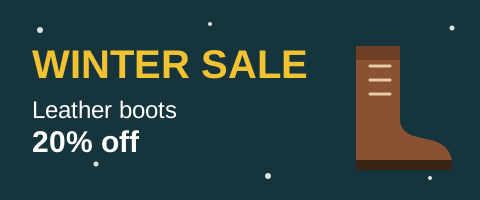
Before, fails 1.1.1
<img src="/banners/winter-sale.svg"
alt="Summer sale: sandals 30% off">After, passes
<img src="/banners/winter-sale.svg"
alt="Winter sale: leather boots 20% off">- axe-core
Passes:
image-altfinds an alt.- Rampa
✗ html > body > main > img:nth-of-type(1)
  The text alternative "Summer sale: sandals 30% off" describes something the image does not show.
  Evidence: "Summer sale: sandals 30% off"
  Patch:
    - <img src="/banners/winter-sale.svg" alt="Summer sale: sandals 30% off">
    + <img src="/banners/winter-sale.svg" alt="Winter sale: leather boots 20% off">
  confidence high · 1/1 runs · evidence verified · id 47563eaa69e7
An icon link called “icon”
Inside a link, the image’s alternative is the link’s name, so it has to say where the link goes. A screen reader announces a link called “icon” and nothing more.

Before, fails 1.1.1
<a href="/cart"><img src="/icons/cart.svg" alt="icon"></a>After, passes
<a href="/cart"><img src="/icons/cart.svg" alt="Shopping cart"></a>- axe-core
Passes:
image-altfinds an alt andlink-namefinds a name.- Rampa
✗ html > body > header > a > img
  The text alternative "icon" is a file name or a placeholder.
  Evidence: "icon"
  Patch:
    - <img src="/icons/cart.svg" alt="icon">
    + <img src="/icons/cart.svg" alt="Shopping cart">
  confidence high · 1/1 runs · evidence verified · id 0dc8e036ebda
What axe-core checks
axe-core 4.14.0 maps seven rules to 1.1.1. Each checks that an element has a text alternative or an accessible name; image-alt also accepts an image marked as decorative. Rampa runs them first and reports their failures as they are. An image that image-alt, input-image-alt, role-img-alt or svg-img-alt failed never goes to the model.
| Rule | What it checks | Mapped to | In a Rampa run |
|---|---|---|---|
image-alt, rule page at Deque University | Images must have alternative text | 1.1.1 | runs |
input-image-alt, rule page at Deque University | Image buttons must have alternative text | 1.1.1, 4.1.2 | runs |
role-img-alt, rule page at Deque University | [role="img"] and [role="image"] elements must have alternative text | 1.1.1 | runs |
svg-img-alt, rule page at Deque University | <svg> elements with an img or image role must have alternative text | 1.1.1 | runs |
object-alt, rule page at Deque University | <object> elements must have alternative text | 1.1.1 | runs |
aria-meter-name, rule page at Deque University | ARIA meter nodes must have an accessible name | 1.1.1 | runs |
aria-progressbar-name, rule page at Deque University | ARIA progressbar nodes must have an accessible name | 1.1.1 | runs |
image-redundant-alt, rule page at Deque University | Alternative text of images should not be repeated as text | best practice | not run: best practice |
None of them reads what the alternative says. alt="8841-front", alt="icon" and an alt written for another picture all pass. The best-practice rule image-redundant-alt flags an alt that repeats the text next to it; Rampa runs only rules tagged with WCAG A and AA, so it is not part of a run.
Each rule links to its page at Deque University, which makes axe-core.
What Rampa judges, and how
What goes to the model
Every img, input type="image", element with role="img" (inline SVG included) and named canvas that has a non-empty text alternative, is not hidden, and was not failed by axe-core. An empty alt marks the image as decorative, so it is not sent. Images are captured as they render: the first 25 on the page that are at least 8 by 8 pixels. An image without a capture is not judged.
What the model sees
- The image as it renders on the page: a PNG of the element, with its size, crop and CSS. Fixed and sticky layers, such as a cookie banner, are hidden while it is taken.
- The current text alternative and the image’s file name.
- The element’s markup, up to 500 characters.
- The name of the link or button the image sits in, which the alternative has to convey.
- Text of the elements around it, up to 300 characters, and the page language for the suggestion.
What it must answer
A verdict (pass, fail or cannot tell), the current alternative copied as evidence, the problem (a file name or placeholder, too generic, wrong content, missing information, or decorative), what the image shows in one sentence, a suggested alternative under 125 characters in the page’s language, and a confidence.
What drops a claim
- The evidence is not the current text alternative.
- There is no description of what the image shows.
- A pass names a problem, or a fail names none.
- A fail that is not about decoration has no suggestion, one over 250 characters, or one equal to the current alternative.
The patch
The suggestion replaces the alt, or the aria-label on elements that have no alt, such as a canvas. For a decorative image, the patch empties the alt. For obvious placeholders such as img-1 or IMG_2034.jpg, a fixed pattern names the problem in the message; the verdict still comes from the model. A suggested alt is for a person to review: what a model says it sees cannot be checked against the page.
For every criterion
- Page content reaches the model marked as data, and the prompt tells it to ignore any instruction inside.
- Answers are cached by a hash of the prompt, the image, the model and its settings, so the same input never calls a model twice.
--runs 3asks three times and keeps the majority; when runs disagree, confidence drops. Findings below--min-confidence(medium by default) are hidden, and--verboselists them.- Claims dropped by verification are counted in every report, never shown as findings.
How Rampa was measured on it
| Set | Tests | Cases | axe-core, precision / recall | Rampa, precision / recall / F1 |
|---|---|---|---|---|
| 1.1.1, image has a name (ACT 23a2a8) | syntax | 18 | 1.00 / 1.00 | 1.00 / 1.00 / 1.00 |
| 1.1.1, name describes the image (ACT qt1vmo) | meaning | 16 | not defined, nothing flagged / 0.00 | 1.00 / 1.00 / 1.00 |
Corrupted pairs: Rampa told 2 of 2 apart (image alt), axe-core 0. A pair is a passing test page and a copy broken on purpose; a checker that gives both the same verdict is not judging.
Run on 9 October 2026: axe-core 4.14.0, Gemma 4 12B on a local GPU, reasoning off, one run, ACT test cases a9a1483e. Small samples and one run: read the numbers as a working pipeline, not as a result.
Read with these caveats
- The first run, on 2026-10-07, had recall 0.67 on qt1vmo. The misses never reached a model, because Rampa did not treat
<canvas>as an image; with that fixed, recall is 1.00. - On 1.1.1 and 3.1.2,
openai:gpt-6-lunagot the same numbers as Gemma in two runs with fresh calls, at about US$ 0.005 per run.
Limitations
- An image with an empty alt is taken as decorative and never sent, so an informative image hidden that way is not caught.
- Only the first 25 images of a page are captured, and images smaller than 8 by 8 pixels are skipped.
- CSS background images, image maps (
area), video and audio are not judged. - A chart or diagram that needs a long description is judged on its short alternative only.
- The model sees pixels, not facts: it cannot know who is in a photo or whether a product code is right. Review every suggested alt before you use it.
- Judging images needs a model with vision, for 1.1.1 and for 1.4.5. Text-only models can judge the other criteria with
--criteria 1.3.5,2.4.2,2.4.4,2.4.6,3.1.1,3.1.2,3.3.2.
Questions about 1.1.1
Can a tool check alt text quality automatically?
In part. A rule can see that an alt exists, and word lists catch file names and words like “image”. Whether the alt says what the image shows takes judgment: Rampa sends the rendered image and its alt to a vision model, one image at a time, and keeps the answer only when the model quotes the alt that is on the page. A person should still review each suggestion.
Does axe-core check alt text quality?
No. Its image-alt rule checks that an image has a text alternative or is marked as decorative, so alt="img-1" passes. Whether the text fits the image is left to people.
What should the alt of a decorative image be?
Empty: alt="", so screen readers skip the image. A word such as “spacer” or “image” in it is WCAG failure F39. When the model says an image is decorative, Rampa’s patch empties the alt.
Are my images sent to a cloud provider?
Only if you choose one. With a local model through Ollama or LM Studio, the image never leaves your machine. With a provider, each image goes in its own request, with its alt and a little context.
Check your pages
Rampa is not on npm yet. Clone it and run it from source with Node.js 22.12 or newer and Chrome or Edge. --criteria 1.1.1 judges only this criterion; leave it out to run the eight that run by default.
With Ollama running, Rampa picks a local model by itself; node dist/cli.mjs doctor says what is missing.
git clone https://github.com/guilhermebsantiago/rampa-cli.git
cd rampa-cli
pnpm install && pnpm build
node dist/cli.mjs check https://example.com --criteria 1.1.1Checked against rampa-cli (commit 0459809) and the W3C sources on 9 October 2026.